
-
Help Support The Rugby Forum :
You are using an out of date browser. It may not display this or other websites correctly.
You should upgrade or use an alternative browser.
You should upgrade or use an alternative browser.
TRF Custom Face Design Tracker
- Thread starter JPilky
- Start date

Help Support The Rugby Forum:


wougie
Academy Player
download a crack on google rugby 08 exe windows crack will the os of rugby 08 is only max compatible until windows 10 sir update your pc till max and checkI have a windows 11 but everytime i go in display settings to change graphics the game kicks me outwhat can i do to fix it

geostar
Bench Player
- Joined
- Sep 28, 2008
- Messages
- 565
- Reaction score
- 143
Delete your ingame profile and try againI have a windows 11 but everytime i go in display settings to change graphics the game kicks me out

jim546
Bench Player
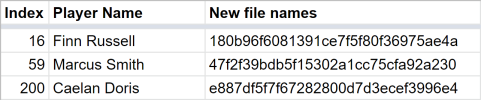
Just 3 heads this time as I'm focusing on kits at the moment, Finn Russell, Marcus Smith and Caelan Doris.
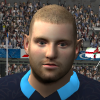
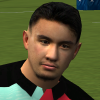
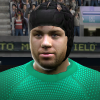
For people asking for a file with all heads added, I've been adding all the heads I have to my Github page. If you go to the main page and click the green "Code" button you can download a zip of all the up-to-date stuff without having to wait for me to create a full release: https://github.com/jimw546/jimw546-s-Rugby-08-stuff
For people asking for a file with all heads added, I've been adding all the heads I have to my Github page. If you go to the main page and click the green "Code" button you can download a zip of all the up-to-date stuff without having to wait for me to create a full release: https://github.com/jimw546/jimw546-s-Rugby-08-stuff
Attachments

Bears Gamer
Academy Player
@jim546 I've had a play around with world league today. Everything seems to work perfectly with no crashes. The only thing i seem to have an issue with is recruitment. When i load it up there are no players or information at all. In trade history there has also been no trades by any other team. Thanks for your work on this , just thought i'd let you know my findings.
jim546
Bench Player
Pretty sure this will solve it: Delete 2de97b250f07a369610d6087471b7aad.xml from your Rugby08 file and start a new World League save. ama1's 22 mod tried to change this to make it WL more of a "free play" mode but it actually made the transfers buggy.@jim546 I've had a play around with world league today. Everything seems to work perfectly with no crashes. The only thing i seem to have an issue with is recruitment. When i load it up there are no players or information at all. In trade history there has also been no trades by any other team. Thanks for your work on this , just thought i'd let you know my findings.
https://www.therugbyforum.com/threads/rugby-08-trf22-patch.48308/post-1085237
Bears Gamer
Academy Player
Thanks mate. Seems to have workedPretty sure this will solve it: Delete 2de97b250f07a369610d6087471b7aad.xml from your Rugby08 file and start a new World League save. ama1's 22 mod tried to change this to make it WL more of a "free play" mode but it actually made the transfers buggy.
https://www.therugbyforum.com/threads/rugby-08-trf22-patch.48308/post-1085237


Romuluse Vavu
Academy Player
- Joined
- Dec 2, 2019
- Messages
- 3
- Reaction score
- 1
can anyone making james lowe face......

shoulderboy86
Academy Player
- Joined
- Oct 24, 2020
- Messages
- 60
- Reaction score
- 12
anyone doing Mt Smart Stadium?

EN9ne
Academy Player
- Joined
- Dec 16, 2020
- Messages
- 181
- Reaction score
- 217
We delegate you to mate lolanyone doing Mt Smart Stadium?
jim546
Bench Player
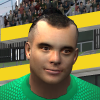
Romuluse Vavu
Academy Player
- Joined
- Dec 2, 2019
- Messages
- 3
- Reaction score
- 1
thanks mate....love it 100%Best I can do for James Lowe, with man-bun. ID is 202. Only Lowe this time as I'm busy with other things.
View attachment 16480


jim546
Bench Player

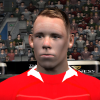
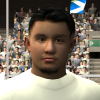
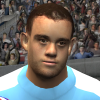

Ezzy
Academy Player
- Joined
- Jul 18, 2015
- Messages
- 478
- Reaction score
- 82
Can I just move the files into the R08 folder or do I need to assign them myself? The reason why I'm asking is because I was wondering if it will mess with your rdf file. I don't want to crash my World League again lol3 heads, 2 re-do's as I didn't like the previous ones:
View attachment 16535
View attachment 16537 View attachment 16538 View attachment 16539
jim546
Bench Player
The re-do's all use the same numbers as the old versions so just drop it in and it'll work. The new ones (Boffelli this time) needs to be assigned, you can edit your WL save to add the assignment with Woosah's editor, or wait for me to create a new rdf and then use it to create a new WL save.Can I just move the files into the R08 folder or do I need to assign them myself? The reason why I'm asking is because I was wondering if it will mess with your rdf file. I don't want to crash my World League again lol
Ezzy
Academy Player
- Joined
- Jul 18, 2015
- Messages
- 478
- Reaction score
- 82
Ok thanks.The re-do's all use the same numbers as the old versions so just drop it in and it'll work. The new ones (Boffelli this time) needs to be assigned, you can edit your WL save to add the assignment with Woosah's editor, or wait for me to create a new rdf and then use it to create a new WL save.

Blues96
Academy Player
- Joined
- Feb 21, 2023
- Messages
- 8
- Reaction score
- 1
Here is a very mucked up Henry Slade. Will need to redo at some point but should be ok for now. Replaces Toby Flood (20448) using big file f12ce63bcba0617fb24742b2478587ee.big
That is the last of the facebuilder heads I made in the trial (outside high poly ones that will potentially crash world cup mode) so would have to buy the facebuilder licence to make any more from now on
LOL this is face Jordie Barrett has on mine. Should I delete and try again?
jim546
Bench Player
Re-starting from scratch would be the safe option. I've made a python script to remove all custom head files from a Rugby 08 install but if you're not familiar with python it might not be easy to use.LOL this is face Jordie Barrett has on mine. Should I delete and try again?
Attachments
Blues96
Academy Player
- Joined
- Feb 21, 2023
- Messages
- 8
- Reaction score
- 1
Thanks mateRe-starting from scratch would be the safe option. I've made a python script to remove all custom head files from a Rugby 08 install but if you're not familiar with python it might not be easy to use.
wougie
Academy Player
Hi guys can any1 make Manie Libbok face id if not to busy thank u will appreciate it I think he gonna be the springboks next number 10 going into the future.
Heya Jim, I asked you about this in a different thread, but this is exactly where I am struggling. If I make my own roster in Woosaah (based on your TRF22 roster and rdf file), and 'set default', the World League players have the mismatched correct head/wrong body problem (but everything else is correct). How did you change/adjust the rdf file (73cb47d1d69c90f28fd1cc4186ac1926) to work with WL and your custom roster so that the bodies didn't look weird?- the old editor didn't carry over any new player skin assignments, so some players had mis-matched head and skin textures, etc. I've fixed this by using the TRF22 rdf to copy over instead of the one from the base game.
Is this something that I would also need corrected in order for WL to work properly?I forgot to switch the "team performance" numbers as they are backwards in WL. I've made a new rdf where the teams are now rated 1-4 low-high, with 4 special teams rated 5: Crusaders, Leinster, Saracens, Toulouse.
Any help is much appreciated
And sorry if these are stupid questions haha
jim546
Bench Player
I got around this by copying the TRF22 .rdf file into Woosah's old editor directory, then running the "set default" option to generate the new .rdf. By doing it this way the old editor tries to replace what's in the TRF22 file instead of using the one from the base game, this should reduce mis-matches.Any help is much appreciated
Yes you will need to do this, otherwise Zebre will be beating Saracens 50-0 every match in WL. I used "Team Editor" to do this I've attached it here.Is this something that I would also need corrected in order for WL to work properly?
Attachments
Hey Jim, I really appreciate you helping me with this. But I think I may be doing something incorrect, or not following your method correctly. I may be making a simple mistake somewhere.I got around this by copying the TRF22 .rdf file into Woosah's old editor directory, then running the "set default" option to generate the new .rdf. By doing it this way the old editor tries to replace what's in the TRF22 file instead of using the one from the base game, this should reduce mis-matches.
– I made a clean install, copied the "TRF 2022 - NH Edition" files into the "Game Files" location
– I then copied from your "jimw546-s-Rugby-08-stuff-main" everything except, "Tournament graphics", "Lions tour" and "Other":
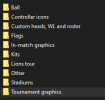
– I used your Rst.ros file from your folder (placed in documents) and the placed World League RDF and RSG you provided, and "Heads" (into "Game Files"):
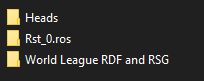
I boot the game and the players appear as they should in the WL. This is all good.
However, I want to make corrections to some player stats in my preferred team (Sharks), as some backline players have "scrummager", etc., and I also want to update the squad with correct players.
– I install Woosaah (old). Open Woosaah, select the "Rugby08.exe" in the "Game Files", open your "Rst.ros" in Documents.
– I then make a change (removing scrummager from L. Am), "Save", and then "Set Default".
– Launch WL and some players have mismatched parts suddenly (but the stats are all good).
Semi side-note - I do often get this error when using Woosaah, but I can restart Woosaah and then make changes successfully (the stats/names are reflected in the WL correctly) – is this error maybe connected to my mismatched body issue (I am guessing it is not connected), or is it okay to quit and reopen and save?:
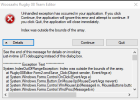
I am not sure exactly what you mean by this: "I got around this by copying the TRF22 .rdf file into Woosah's old editor directory, then running the "set default" option to generate the new .rdf. By doing it this way the old editor tries to replace what's in the TRF22 file instead of using the one from the base game, this should reduce mis-matches."
This TRF22.rdf file that you mention, it is fine if I use your 73cb47d1d69c90f28fd1cc4186ac1926.rdf file? This part: "TRF22 .rdf file into Woosah's old editor directory" – do you mean that you copy the .rdf into the installation location of Woosaah, or that you copy the your working .rdf into the Rugby08.exe folder, then "Set Default".
I hope that is enough info...I feel so close to getting this correct!
Attachments
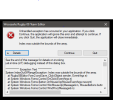
jim546
Bench Player
Just before this step here:
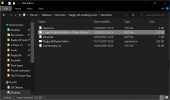
Copy my custom .rdf or the TRF22 .rdf into the folder (ie. next to the .exe) for Woosah's old editor. The Old Editor uses the .rdf next to its .exe to make edits, not the one in the Rugby 08 directory.– I install Woosaah (old). Open Woosaah, select the "Rugby08.exe" in the "Game Files", open your "Rst.ros" in Documents.
Thank you so much for your help!!! Your image helped me solve the problem. I apparently hadn't installed the editor correctly and this resulted in the issues. I have never used it before, so wasn't sure of what the folder contents were meant to look like (and no idea something was wrong before your image). I realised that it was very important to specify the installation location, instead of using the default location.Just before this step here:
Copy my custom .rdf or the TRF22 .rdf into the folder (ie. next to the .exe) for Woosah's old editor. The Old Editor uses the .rdf next to its .exe to make edits, not the one in the Rugby 08 directory.
I think I may get more involved in this community, I do love making/editing/using mods, but also am a rugby fan. We are niche group for sure, haha. Once I learn more about custom resolutions and the basic splash page and background imagery I may try and design some things...I do some graphical editing for my job.
From a 3D graphical improvement aspect I have used the NVIDIA control panel to improve the graphics noticeably – more anti aliasing, better texture filtering (so that looking at the pitch at oblique angles is more crisp). I have also tried using a 3rd party AI upscaler, which also can increase the sharpness etc., but would need to test it out more before making recommendations, the app is called Lossless Scaling, it is a dollar or so on Steam.
Thanks again
jim546
Bench Player
You could also try RTX Remix if you have a 30 or 40-series Nvidia card. I've tried it but got stuck on the resolution not working above 640*480.From a 3D graphical improvement aspect I have used the NVIDIA control panel to improve the graphics noticeably – more anti aliasing, better texture filtering (so that looking at the pitch at oblique angles is more crisp). I have also tried using a 3rd party AI upscaler, which also can increase the sharpness etc., but would need to test it out more before making recommendations, the app is called Lossless Scaling, it is a dollar or so on Steam.
jim546
Bench Player
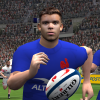
In case of emergency, break glass:
Similar threads
- Replies
- 12
- Views
- 537
- Replies
- 31
- Views
- 18K


- Replies
- 56
- Views
- 20K


