otgmullet
Academy Player
Hey @ama1are you able to upload a roster thats current as of today, for the ps2? Cheers
Hello @ama1, thank you again for sharing your mod.How I do it.
1.) I have extracted the ps2 .iso into a folder on my PC.
2.) I use BIGGUI to Import the .rdf file into the DATA.GOB
3.) I use ImgBurn to create a new image file from files/folders.
4.) I create a new .iso file by adding everything from the extracted ps2 .iso (including the newly modified DATA.GOB
5.) Once the .iso has been created - I test it in PCSX2
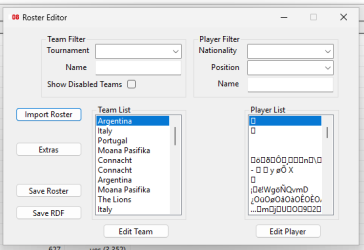
My roster editor can not import an .rdf file yet, I also haven't found a way to make the proper files for the PS2 version of the game.I wonder how can you edit player names ? in Jim editor, this is how I see player names> impossible to understand anything (see the attachment). Do you translate the .rdf with a hexagon editor first and then edit it with the Jim Roster editor ? how ?
Hi @jim546 thanks for replying. Your editor works with a roster.bin from a PC save ? sorry unfortunately I don't have PC so I don't know how it works and I saw in the main editor topic something with the .rdf that's why I thought I had to load it with this tool.My roster editor can not import an .rdf file yet, I also haven't found a way to make the proper files for the PS2 version of the game.
"Yes, the "Save RDF" button will create 73cb47d1d69c90f28fd1cc4186ac1926.rdf
Thanks I tried change names with a hexa edit and works well IG !Yes, you can modify names and players. For the PS2 version, you can create a roster using Jim's editor. Use the Save RDF which creates 73cb47d1d69c90f28fd1cc4186ac1926.rdf. Once that's done you open the DATA.GOB file with BIGGUI and import 73cb47d1d69c90f28fd1cc4186ac1926.rdf. Use a tool such as IMGBURN to rebuild the ps2 .iso - ensuring you add the newly modified DATA.GOB.