• Help Support The Rugby Forum :

Jim's Roster Editor

The Rugby Forum - Global Rugby Union News, Six Nations & RWC Discussion

Help Support The Rugby Forum:

Also each time I try to convert the txt to xml it doesn't show like the game files, it has the browser logo and xml ain't at the back
Don't convert anything to a text file or .txt as this will not work, just open the files with a text editor (right-click the file, open with, notepad). I use Notepad++ but the basic Notepad in Windows also works.
 
Last edited:
Don't convert anything to a text file or .txt as this will not work, just open the files with a text editor (right-click the file, open with, notepad). I use Notepad++ but the basic Notepad in Windows also works.
Will it remain .xml after I save it?
 
Don't convert anything to a text file or .txt as this will not work, just open the files with a text editor (right-click the file, open with, notepad). I use Notepad++ but the basic Notepad in Windows also works.
Also in the xml file there's no place for me to edit the RGBA colours to exactly match homecolour and awaycolour that includes body jersey and shorts for home , and same goes for away. Or The "Split" Theory, does the game split those 4 values to cover the whole kit? Like there's 4 at home and 4 at away... does it include shorts and legs?
 
Also in the xml file there's no place for me to edit the RGBA colours to exactly match homecolour and awaycolour that includes body jersey and shorts for home , and same goes for away. Or The "Split" Theory, does the game split those 4 values to cover the whole kit? Like there's 4 at home and 4 at away... does it include shorts and legs?
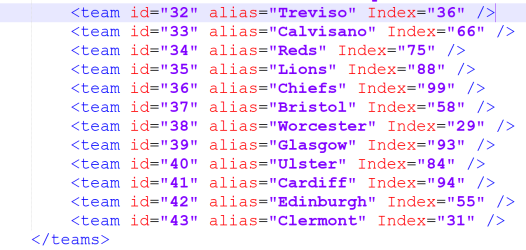
I'm not sure what you mean, do you mean this bit?:

1775138788830.png

If so, those are not used in the kits. Those colours are used on the player dots in the mini-radar in the game. All kits and logos etc for the teams are made from image textures, they are in files ending .fsh or .big.
 
I gave up on that endeavour as I'll never be able to make it. But what I think I can do is replace a team in the World League, .rdf file right? In Rugby 08 24 mod, Perpignan is there but not Toulon. How can I get Toulon in Perpignan's place please.
 
As an Amazon Associate we earn from qualifying purchases. Product prices and availability are accurate as of the date/time indicated and are subject to change.
I gave up on that endeavour as I'll never be able to make it. But what I think I can do is replace a team in the World League, .rdf file right? In Rugby 08 24 mod, Perpignan is there but not Toulon. How can I get Toulon in Perpignan's place please.
 
hey bro idk how to contact you in priv so im asking here.... how or do we use the Jimw546 Rugby 08 Stuff Main folders from your github.... like drag all the folders inside the root of the game or just the files from those folders or just ignore it and only use TRF24 Mod, Jimw546 Rugby 08 2023-24 Season All Items? thanks
 
hey bro idk how to contact you in priv so im asking here.... how or do we use the Jimw546 Rugby 08 Stuff Main folders from your github.... like drag all the folders inside the root of the game or just the files from those folders or just ignore it and only use TRF24 Mod, Jimw546 Rugby 08 2023-24 Season All Items? thanks
To use my files, download them from Github and put the files (.fsh, .big etc.) you want to use directly into the root folder of the game. If you leave them in their sub-folders the game will not read them.
 
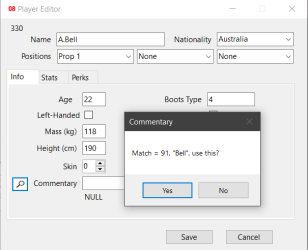
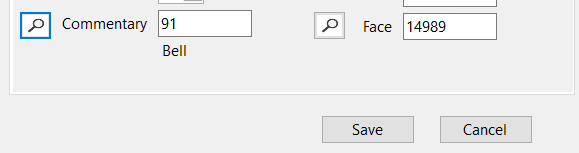
Small WIP update, adding buttons to the player editor to automatically look-up the correct commentary name/head model if either exist, press the magnifying glass to auto-match the players name, so far the commentary one works, have yet to make a list for the player heads:

1783105248049.png 1783105404814.png
 
Great job mate, thank you.
For a running rugby experience I always added Matt Giteau to the opposition at flyhalf coz he never kicked the ball, with the help of Woosahs editor.
Big scores & great running rugby.
 

Latest posts

Back
Top