• Help Support The Rugby Forum :

TRF Custom Face Design Tracker

The Rugby Forum - Global Rugby Union News, Six Nations & RWC Discussion

Help Support The Rugby Forum:

Luke Jacobsen from New Zealand
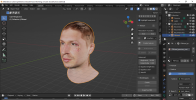
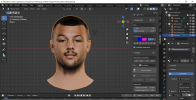
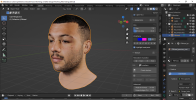
Having a lot of problems with O'tools not exporting model with Skeleton my holding point at this stage to get finished faces into game
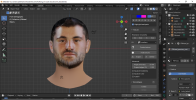
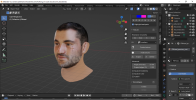
Luke Jacobsen.pngLuke Jacobsen 2.png
 
Having a lot of problems with O'tools not exporting model with Skeleton my holding point at this stage to get finished faces into game
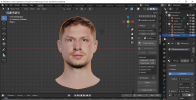
The models should all use the same skeleton, you can copy/paste it from another project if you have one available or use the one I've uploaded below.

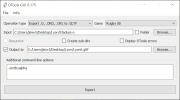
Edit: Just looked at your photos above of OTools, try turning off "Folder" mode on the input directory change the input to your .o file not its folder, for example:

Untitled.png
 

Attachments

Last edited:
Thank you
The models should all use the same skeleton, you can copy/paste it from another project if you have one available or use the one I've uploaded below.

Edit: Just looked at your photos above of OTools, try turning off "Folder" mode on the input directory change the input to your .o file not its folder, for example:

View attachment 14313
Thank you Jim546 appreciate will give it a go
 
Hi Jim546

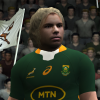
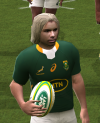
As per pictures below PS du Toit shows perfectly when Camera zoom in

View attachment 14158

But when the camera zoom out or in game play you wil get this type of face
And i used the same file as per design tracker what i see is the larger files from 800 on ward seem to have this problem most of the 300 region files is fine

View attachment 14159
Hi, did you ever get around with a "FIX" to this? I recently downloaded some faces and game does exactly the same - once zoomed in it shows face, zoomed out it goes orange...
 
Hi, did you ever get around with a "FIX" to this? I recently downloaded some faces and game does exactly the same - once zoomed in it shows face, zoomed out it goes orange...
But when the camera zoom out or in game play you wil get this type of face
And i used the same file as per design tracker what i see is the larger files from 800 on ward seem to have this problem most of the 300 region files is fine

Check what "Force LOD" is set to under the display options in your game. I've just replicated your errors by changing it to "Off". Switching LOD to "High" seems to fix it.

I think it's because the custom textures don't have any mipmaps with them. When you switch to low LOD the game sees the large base texture for the head and tries to load a lower res version instead, which it can't find hence the "no texture" error you get.
 
Check what "Force LOD" is set to under the display options in your game. I've just replicated your errors by changing it to "Off". Switching LOD to "High" seems to fix it.

I think it's because the custom textures don't have any mipmaps with them. When you switch to low LOD the game sees the large base texture for the head and tries to load a lower res version instead, which it can't find hence the "no texture" error you get.
Tested it now with O.Farrel head and work perfect thank you x10000000
Blessing Jim546
 
Check what "Force LOD" is set to under the display options in your game. I've just replicated your errors by changing it to "Off". Switching LOD to "High" seems to fix it.

I think it's because the custom textures don't have any mipmaps with them. When you switch to low LOD the game sees the large base texture for the head and tries to load a lower res version instead, which it can't find hence the "no texture" error you get.
Thanks again, it worked after switching LOD to "High"
 
Found an easier way to do vertex group assignments, using weights in Blender, the second half of this video is the most relevant:


For custom models I've got it to work by putting your new head onto the skeleton with empty weights then copy into the scene a head that already has assignments. Click on this head then shift-click your new one, then follow the video tutorial above, go to weight paint mode and press weights - transfer weights and select either "by name" or "by order" for "source layers" in the next sub-menu.

You can now delete the old head from the scene. If everything has copied properly, the vertexes that are assigned in a group should show as red sections on the head in weight paint mode.

Unfortunately you will need to clean up the groups following this method. In weight paint mode click weights and select "clean" then increase the clean threshold above 0.00 to remove errors in the assignments. This whole process should speed things up but it's not the cleanest method.
 
hello there, most of the faces i downloaded are in the wrong teams, can anyone help me fix that please ?
 
Found an easier way to do vertex group assignments, using weights in Blender, the second half of this video is the most relevant:


For custom models I've got it to work by putting your new head onto the skeleton with empty weights then copy into the scene a head that already has assignments. Click on this head then shift-click your new one, then follow the video tutorial above, go to weight paint mode and press weights - transfer weights and select either "by name" or "by order" for "source layers" in the next sub-menu.

You can now delete the old head from the scene. If everything has copied properly, the vertexes that are assigned in a group should show as red sections on the head in weight paint mode.

Unfortunately you will need to clean up the groups following this method. In weight paint mode click weights and select "clean" then increase the clean threshold above 0.00 to remove errors in the assignments. This whole process should speed things up but it's not the cleanest method.

If you know how to write scripts for Blender,
and if all your models use the same UV layout,
you can write a script which will assign specific vertex weights for specific vertexes by their UVs.
Check what "Force LOD" is set to under the display options in your game. I've just replicated your errors by changing it to "Off". Switching LOD to "High" seems to fix it.

I think it's because the custom textures don't have any mipmaps with them. When you switch to low LOD the game sees the large base texture for the head and tries to load a lower res version instead, which it can't find hence the "no texture" error you get.
most probably the game shows a different head model (really low-poly) on a distance, which uses a different UV layout.
 
Cheslin Kolbe replaces S.Larkham (ID = 8759). BIG file = 3aef408c0d4b4deee9db909d9d3ac9cc.big

View attachment 11169

View attachment 11170
Guys any know how to get Cheslin kolbe in the game without using woosah editor I am struggling with it at the other players as well his face is not with the latest heads in the 22 mod heads package
 
Is anyone here able to edit 73cb.. .rdf, the file that controls rosters for the World League? It turns out Woosah's editor CAN take any input values for head/face assignment, so I was thinking of reassigning the already created heads to a new range, basically start from 1 and work up.

I can easily reassign the roster using Woosah's editor and I can rename all the existing heads, but I can't edit the rdf. ama1 has created a tutorial here, unfortunately I don't have Excel: https://www.therugbyforum.com/threads/rugby-08-roster-hex-editing.47582/

Also, what is the best roster to use? I'm currently using the files from ama1's 22 mod but I know someone else uploaded another one with some tweaks to SA players.

Edit: Actually some numbers not working, will need to look into a bit more.
 
Last edited:
New roster as in updated squads?
Guys I struggle to get right faces in right countries or clubs I normally put it in my main folder but where do I put this roster update matching with heads because my 125 heads are stil the same did I did something wrong..?
 
Download the link above, jim546 has reassigned all faces and included the faces and roster.
 
also must I delete the 22 roster in game and replace with this heads roster in my documents folder should there be only 1 roster neh.
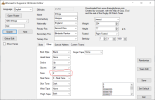
If you can't get the included roster to work, the alternative is to edit your existing roster using Woosah's roster editor. I included a spreadsheet in the download with the player name and an index, the index is the player's new head/face number.

For example, Maro Itoje is number 2 in the new index. Search "Itoje" in the editor, then type "2" in the face box and press save.

editor.png
 
If you can't get the included roster to work, the alternative is to edit your existing roster using Woosah's roster editor. I included a spreadsheet in the download with the player name and an index, the index is the player's new head/face number.

For example, Maro Itoje is number 2 in the new index. Search "Itoje" in the editor, then type "2" in the face box and press save.

View attachment 15294
Where can I get this? Damian Willemse face is wrong and I want to change it. I have an old editor. The teams and faces are wrong/old in it. It doesn't display the new faces and teams
 
Where can I get this? Damian Willemse face is wrong and I want to change it. I have an old editor. The teams and faces are wrong/old in it. It doesn't display the new faces and teams
Looks like Willemse is here: https://www.therugbyforum.com/threads/en9nes-faces.47658/page-5#post-1068203. I didn't include him as I wasn't aware he'd been made. I have a number of reserved heads on my list that I never got around to and he is on it as number 151.

Download the linked file, change its name to 6f46f4391b4c3848cb0ab7e15179b3e8.big and change Willemse's head number to 151 in the roster editor, this should work.

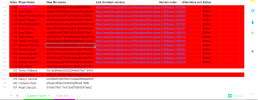
There's a lot of players in red on my excel sheet that aren't included, mostly because I never got around to testing them:

Untitled.png

I was planning on coming back to this in the future and assigning the remaining heads and linking the new stadiums to the correct teams, which is possible but it's finicky. I'm doing other stuff with new stadiums at the moment. If anyone else wants to match up the player heads feel fee to do so I've attached my lists.
 

Attachments

Latest posts

Back
Top